Last updated: November 2026
Most short videos are lost before the viewer hears a single word. People decide in the first one or two seconds whether to keep watching or swipe, so the opening has to do one job: make them stop. A transitional hook is a short, high-energy clip that sits in front of your real content and does exactly that. Below are 16 transitional hook examples you can watch right here, with notes on what each one does well and which kind of video it suits. Every clip is vertical 1080×1920, so it drops straight into TikTok, Instagram Reels and YouTube Shorts.
All of these clips are free to download from the Hook Transition library, with no sign-up.
How to use a transitional hook (in 3 steps)
- Pick a hook that matches the promise of your video. A countdown suits a reveal, a price stamp suits a deal, a reaction face suits a surprise. A hook that has nothing to do with the content gets the stop but loses the viewer a second later.
- Keep it short. One to three seconds is enough. Cut the hook on a beat or on the moment of impact, then go straight into your first real shot.
- Bridge it with a cut or a quick transition. A hard cut, a whip pan or a zoom makes the hook feel like part of the video rather than a separate intro.
If you want a deeper explanation of why this works, read how to create stop-scroll videos that people actually watch.
Text hooks: say the promise on screen
Text hooks work even with the sound off, which matters because many people scroll muted. They are the safest choice for tutorials, tips and talking-head videos.
1. Stop Scrolling (glitch)
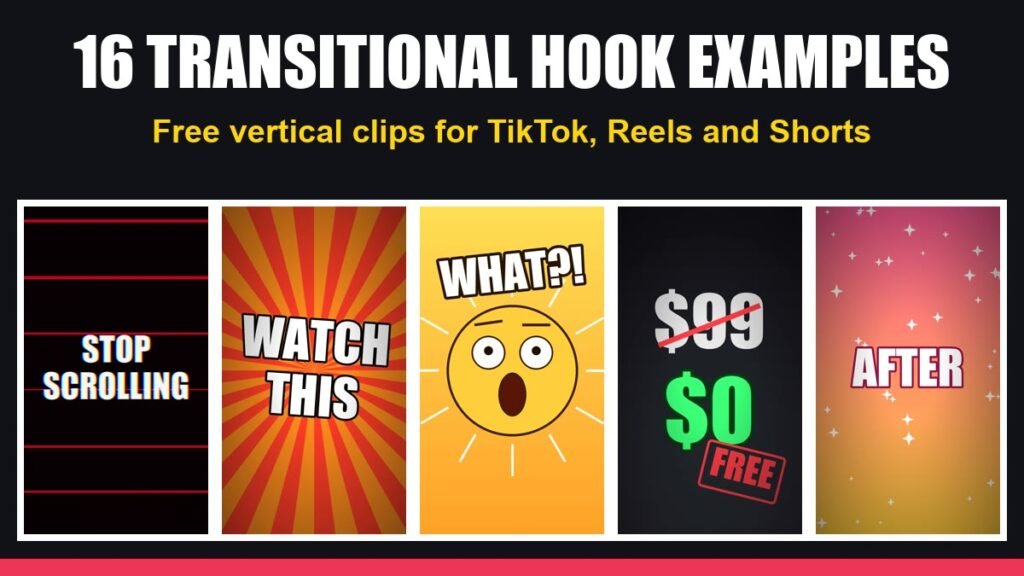
Bold white “STOP SCROLLING” with red scan lines and an RGB glitch. It speaks directly to the viewer’s thumb. Best for: tips, lists and any video where the value is in the next few seconds.
2. Wait For It…
“WAIT FOR IT…” with a loading bar that fills up. It creates a small open loop: viewers stay to see what the bar is leading to. Best for: transformations, satisfying results, punchlines.
3. POV Typewriter
“POV:” followed by a line that types itself out. The POV format is instantly recognisable on every short-form platform. Best for: relatable, story-style and behind-the-scenes content.
4. Nobody / Me Meme
The classic “Nobody: / Absolutely nobody: / Me:” meme on a clean white background. It signals humour straight away. Best for: funny or self-aware content, creator life, niche jokes.
5. Price Drop Stamp
“$99” gets crossed out and a green “$0” with a red FREE stamp lands underneath. Nothing makes a viewer stop like a price falling. Best for: free tools, deals, discounts and “you don’t need to pay for this” videos.
6. Countdown 3-2-1
A big number counting down inside a red ring. Countdowns create anticipation because the brain wants to see what happens at zero. Best for: reveals, launches, before/after results.
7. Breaking (lightning)
A dark scene, a flash, and “BREAKING” slams in like a news alert. Best for: news, updates, platform changes and hot takes.
8. Watch This (zoom punch)
“WATCH THIS” punches in over a bright sunburst background. Loud, simple and impossible to miss. Best for: demos, tricks and anything visual.
Reaction hooks: show the feeling first
Reaction hooks borrow emotion. When viewers see surprise, they expect something surprising to follow.
9. Shocked Face (WHAT?!)
A calm emoji face that suddenly drops its jaw, with “WHAT?!” on top. Best for: surprising facts, unexpected results, “I didn’t know this” content.
10. Confetti Surprise
“YOU WON’T BELIEVE THIS” with falling confetti on a purple background. Best for: giveaways, milestones, wins and celebrations.
Motion and transition hooks: let the movement do the work
These hooks have little or no text. They stop the scroll with motion, colour and contrast, which makes them easy to reuse across many videos. Pair them with your own on-screen caption.
11. Whip Pan Transition
A fast sideways blur of colour, like the camera being whipped to a new scene. Best for: jumping into the action, travel, outfit and room changes.
12. RGB Glitch Transition
TV colour bars that break into glitch noise and a “SIGNAL LOST” message. Best for: tech, gaming and “this changes everything” videos.
13. Vortex Tunnel
A spinning neon tunnel that pulls the eye to the centre of the screen. Best for: music, edits, “rabbit hole” topics and mind-blowing facts.
14. Before / After Wipe
A grey “BEFORE” screen wipes into a bright, sparkling “AFTER”. It promises a transformation in under three seconds. Best for: makeovers, editing tutorials, fitness and cleaning.
15. Water Drop Ripple
A single drop hits calm blue water and sends out ripples. Quiet and satisfying, which stands out in a loud feed. Best for: calm, aesthetic, wellness and ASMR-style content.
16. Ball Drop Impact
An orange ball drops and hits the floor with a shockwave ring. Cut your first shot on the impact for a hit that feels physical. Best for: sports, product drops and high-energy openings.
Which hook should you pick?
| Your video is about… | Try these hooks |
|---|---|
| Tips, tutorials, how-to | Stop Scrolling, Watch This, Countdown |
| A deal, free tool or discount | Price Drop Stamp, Confetti Surprise |
| A transformation or result | Before / After Wipe, Wait For It, Countdown |
| News or an update | Breaking, RGB Glitch |
| Something funny or relatable | Nobody / Me, POV Typewriter |
| A surprising fact | Shocked Face, Vortex Tunnel |
| Calm or aesthetic content | Water Drop Ripple |
| Sports, action, product drops | Ball Drop Impact, Whip Pan |
4 mistakes that make a good hook fail
- The hook promises something the video doesn’t deliver. Viewers feel tricked and swipe. Match the hook to the payoff.
- The hook runs too long. After about three seconds it stops being a hook and becomes an intro. Trim it.
- Using the same hook on every video. Your regular viewers learn to skip it. Rotate between a few that fit your niche.
- No caption after the hook. The hook earns two seconds; your first line of text earns the next ten. Put the topic on screen straight away.
Not sure which opening works best for your audience? Use the free Hook Analyzer to score your opening, then test a few different hooks and keep the winner.
Frequently asked questions
Are these transitional hooks free to use?
Yes. Every clip in this article can be downloaded from the Hook Transition library without creating an account.
What size are the clips?
They are vertical 9:16 MP4 files at 1080×1920 and 30 fps, between two and three seconds long, so they fit TikTok, Reels and Shorts without cropping.
How do I add a hook in CapCut or another editor?
Import the hook clip, place it at the very start of your timeline, trim it to the strongest moment, and cut straight into your first shot. Add your own caption on top if the hook has no text.
Will a hook clip hurt my brand?
Not if it fits your style. Choose hooks whose colours and tone match your content, and read how to use hook clips without hurting your brand for more tips.
Ready to try one? Browse the free hook library, download two or three that fit your niche, and put one in front of your next video.


